The short answer
Divide the amount in the foreign currency by the amount that left your account: that is the rate your bank applied. Then convert the same foreign amount at a reference rate for the same day, such as the European Central Bank's, and compare the two amounts. The percentage difference is the markup, everything the conversion cost you, fees included.
You need one line from your statement and one public rate.
What you need from the statement
A card statement line for a foreign-currency payment usually shows:
- the amount debited from your account, in your account's currency
- the original amount and currency the merchant charged
- a transaction date (when you paid) and often a posting or processing date (when the bank booked it)
Some banks also print the rate they used and a separate "foreign transaction fee" line. Add that fee to the debited amount before you calculate, because the cost of the conversion includes it.
If the statement shows only the amount in your currency, look for the original amount in the transaction details in your banking app, or on the merchant's receipt.
A worked example
You pay for something online on Saturday 12 September 2026. The price is USD 50.00 and your card is a euro card. Your statement shows a payment of EUR 44.12, posted on Monday 14 September. (The payment and the EUR amount are an example; the reference rates below are the real published ones.)
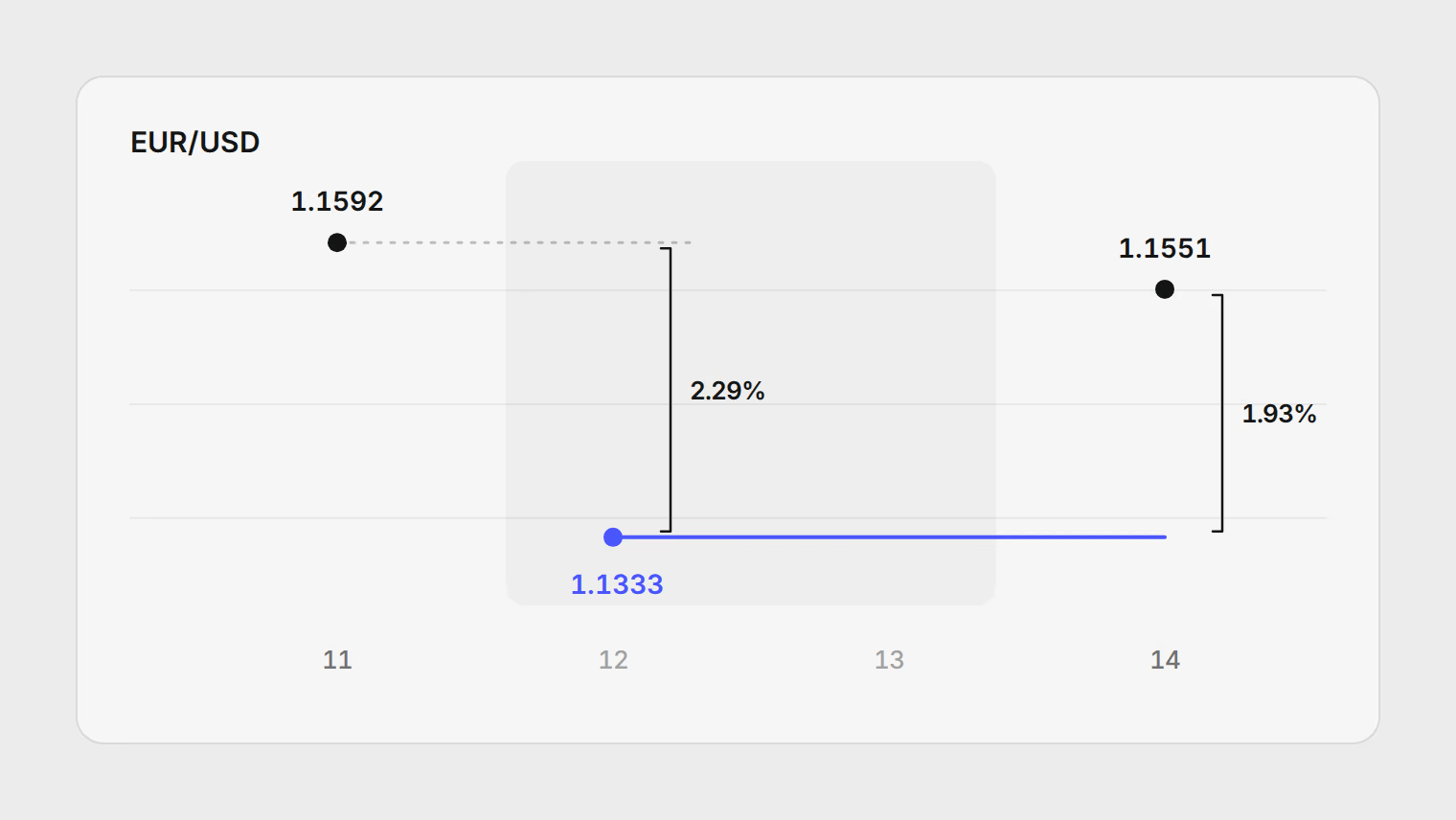
Step 1: the rate your bank applied. 50.00 ÷ 44.12 = 1.1333 US dollars per euro. Put the other way round, you paid 0.8824 euros for each dollar.
Step 2: the reference rate. The ECB publishes one euro reference rate per currency on working days, usually around 16:00 CET, and nothing at weekends. The latest rate before the Saturday purchase is Friday's:
| Date | USD per EUR |
|---|---|
| Friday 11 September | 1.1592 |
| Saturday 12 September | None (no fixing) |
| Sunday 13 September | None (no fixing) |
| Monday 14 September | 1.1551 |
Step 3: the reference cost. At Friday's rate, USD 50.00 is 50.00 ÷ 1.1592 = EUR 43.13. At Monday's rate it is 50.00 ÷ 1.1551 = EUR 43.29.
Step 4: the markup. Divide what you paid by the reference cost and subtract one:
- against Friday's rate: 44.12 ÷ 43.13 − 1 = 2.29%
- against Monday's rate: 44.12 ÷ 43.29 − 1 = 1.93%
So this payment cost about two percent more than the reference rate. On EUR 44, that is under a euro. On a EUR 2,000 deposit for a flat, the same markup is roughly EUR 40.
Which date to compare against
The example gives two answers because a card payment has two dates. The bank converts when the card network processes the payment, which can be a day or more after you paid, and longer over a weekend. If the rate moved in between, the wrong day makes the markup look bigger or smaller than it is.
- If you know the date the bank actually converted, because the statement or the bank says so, compare against the reference rate for that date only.
- When no rate was published that day (a weekend or a holiday), use the latest one before it. Do not average the days around it.
If you do not know the conversion date, do not pick one of the figures. Report each comparison with its date, as in Step 4: "2.29% against Friday's rate, 1.93% against Monday's". Asking your bank which date it used settles it. To judge a card over time, check five or six payments the same way and look at the range.
What the reference rate is, and is not
The ECB says its reference rates are "published for information purposes only" and that using them for transactions is "strongly discouraged". Nobody can trade at it. That makes it a fair yardstick: it is published, the same for everyone, and set by no bank, so every card is measured against the same line.
For card payments in EU currencies, it is also the benchmark the law uses. Under the EU's cross-border payments regulation, card issuers and anyone offering currency conversion at a cash machine or payment terminal must express their total currency conversion charges as a percentage markup over the latest ECB euro reference rate, and show it before you pay.
Your bank must also send you an electronic message with that markup when you pay or withdraw cash in an EU currency other than your account's:
- It is due for each card linked to the account, once in each month you use that currency.
- You can opt out.
- A business or freelance account may not get it at all: for customers who are not consumers, the bank and the customer can agree that these messages do not apply.
If you hold a euro card and paid in Polish zloty or Swedish krona, that message gives you the markup without any arithmetic.
Outside the EU, nothing obliges a bank to state the markup this way, but the calculation above still works. You need a reference rate that covers both currencies:
- The ECB covers your pair through the euro. For a Turkish lira card paying in dollars, divide the lira rate by the dollar rate: on 14 September 2026 that was 56.1636 ÷ 1.1551 = 48.62 lira per dollar. The EU regulation describes the same derived rate for conversions between two currencies other than the euro.
- The ECB does not cover your currency. It publishes no rate for the Azerbaijani manat, and it suspended the Russian rouble rate in March 2022. Use your central bank's official rate instead. For the manat, the Central Bank of Azerbaijan publishes official rates every day.
The terminal question that costs the most
Abroad, a card terminal or cash machine sometimes offers to charge you in your own currency. This is dynamic currency conversion: the merchant's provider converts the amount at a rate it sets, not your bank.
In the example, suppose the terminal had offered "Pay EUR 46.90 or USD 50.00". The same arithmetic gives the answer before you press anything: 46.90 ÷ 43.29 − 1 = 8.35% over Monday's reference rate, against roughly two percent through your bank. Under the EU regulation, a provider in the EU offering this choice must show the markup, show both amounts, and tell you that you can pay in the local currency instead.
- At Monday's reference rate43.29
- As your bank charged it44.12+1.93%
- As the terminal offered46.90+8.35%
Pay in the currency of the country you are in, and let your own bank convert. Then check its markup with the method above. If it is consistently high, use a different card abroad rather than accept the terminal's offer.
Which rate to use in your own records
Checking a markup and keeping records are different jobs, with different rates.
| Job | Rate to use | Why |
|---|---|---|
| What a payment cost you | None: the amount that left your account | It already includes the bank's rate and fees |
| Checking your bank's markup | A reference rate for the processing date | Neutral and published, so cards compare on one line |
| Comparing accounts held in different currencies | One published rate per day, applied consistently | Totals stay comparable from month to month |
| Tax reporting | The rate your tax authority specifies | Authorities set their own rules; check before you file |
The first row matters most. If your account is in euros, the payment cost EUR 44.12. Converting USD 50.00 again at a market rate would understate it by the markup you just measured. You need a foreign rate only when the account itself is in another currency: a dollar account, a Wise balance, a card from the country you left.
For tax, follow the rule where you file. The IRS, for example, says to translate foreign currency at the exchange rate prevailing when you receive, pay or accrue the item, and it also publishes yearly average rates. This article does not tell you which rate your return should use.
Doing this for a whole statement
One payment is a calculator job. A month of payments in three currencies across two cards is a spreadsheet: one row per payment with the original amount, the debited amount and the date, a column of reference rates looked up by date, and the markup formula from Step 4.
Pulget does the bookkeeping half of that:
- It keeps each account in its own currency and converts every transaction for reports at the published rate for its own date, or the latest one before it. A weekend purchase uses Friday's rate.
- On a transaction, you can record that the merchant charged in another currency and enter the amount it charged. The rate your bank applied is worked out from the two amounts and kept with the payment.
- For an account held in another currency than your reports, you can replace the published rate with the one your bank used.
The multi-currency guide explains where the published rates come from. If you are adding up a move abroad, what the move cost across currencies uses the same rules, and plans and file limits are on the pricing page.
Last checked on 18 October 2026 against the sources listed at the end of the article.
Sources
Related reading
About the author
Hikmat Samadov, Founder. Hikmat builds Pulget, a spending tracker that reads the bank statements you upload instead of connecting to your bank.