The short answer
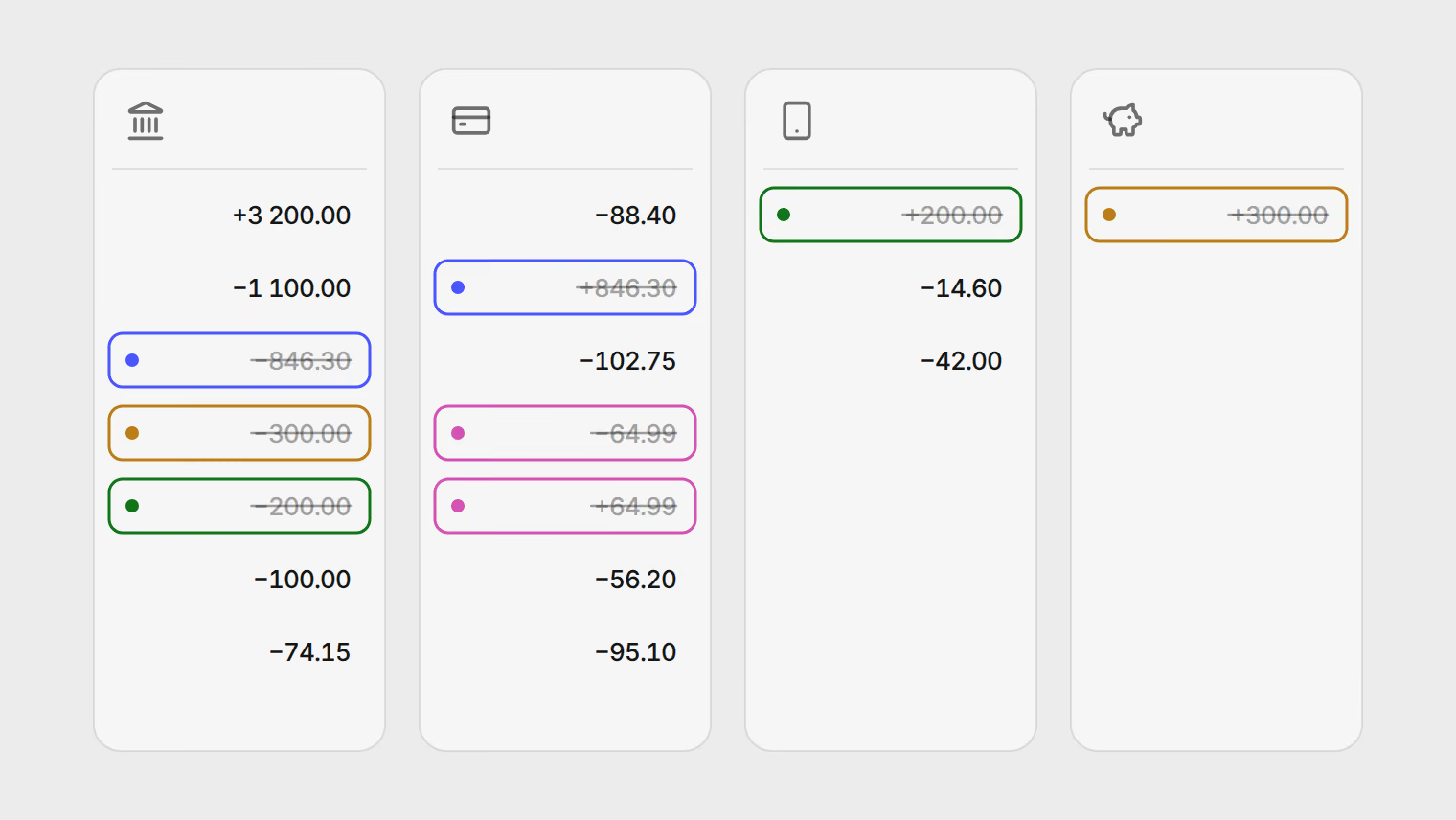
When you put several accounts' statements in one sheet, the same money shows up more than once. A credit card payment appears on the current account and again on the card, a transfer to savings leaves one account and arrives in another, and overlapping downloads repeat whole weeks. Adding up every outgoing amount can give a spending total far higher than what you spent.
Four rules fix it: count card purchases and not card payments, give every transfer between your own accounts its own type, pair refunds with what they refund, and remove overlapping rows before you add anything up. Then one check confirms it: your own transfers should add up to zero.
A worked month
One month, one person, four accounts, all in euros. The figures are an example; the pattern is common.
| Account | Rows on the statement | Money in | Money out |
|---|---|---|---|
| Current account | Salary; rent, electricity, cash machine; card payment, savings, top-up | 3,200.00 | −2,620.45 |
| Credit card | Five purchases, one of them refunded; the card payment received | 911.29 | −407.44 |
| Payment app | Top-up received; café, train tickets | 200.00 | −56.60 |
| Savings | Transfer received | 300.00 | |
| All four | 18 rows | 4,611.29 | −3,084.49 |
The naive total. Add up every negative amount and you get EUR 3,084.49 of "spending".
What was actually spent. Rent 1,100.00, electricity 74.15, card purchases 342.45 (the online order was refunded, so it nets to zero), payment app purchases 56.60, and 100.00 in cash: EUR 1,673.20.
The naive figure is 84% too high. All of the difference, EUR 1,411.29, comes from four rows:
- the card payment, 846.30, which pays for purchases already counted on the card statement (in this case February's)
- the transfer to savings, 300.00, which is still your money
- the top-up to the payment app, 200.00, which is spent later, row by row, on the app's own statement
- the refunded order, 64.99, counted as spending with its refund ignored
- Every outgoing amount3,084.49
- Card payment−846.30
- Transfer to savings−300.00
- Top-up to payment app−200.00
- Refunded order−64.99
- Actually spent1,673.20
Income is inflated the same way. Adding up every positive amount gives EUR 4,611.29, not the 3,200.00 salary.
The check that catches it
Add up every row, positive and negative, across all four statements. The answer is EUR 1,526.80, and that number is right: 3,200.00 earned minus 1,673.20 spent. Money moving between your own accounts leaves one and arrives in another, so the two sides cancel in the net.
That gives a quick test for any month you combine:
- Mark every row that moves money between your own accounts as a transfer.
- Add up only the transfer rows. They should come to zero.
- If they do not, something is missing or repeated: a leg on an account you did not download, a week that appears twice, or a transfer that changed currency on the way.
The net can be right while spending and income are both far too high, because the extra counts cancel. Use it as a check, not as a report: it is the category totals that go wrong.
The four rules
Count card purchases, not card payments
A credit card has two kinds of rows: what you bought, and what you paid back. Count the purchases; they have the merchant, the date and the amount of each thing you bought. The payment is one lump sum that settles a balance, usually for the previous month, so counting it as spending either counts those purchases twice or moves them into the wrong month.
If you do not have the card statement, the payment is the only trace of that spending. Download the card statement rather than counting the payment: a lump called "credit card" tells you nothing about where the money went.
Give transfers between your own accounts their own type
Savings, a payment app, a second bank, a currency account: money moved there is still yours. Mark both sides as a transfer and leave them out of spending and income. A top-up to a payment app is a transfer too; the spending happens later, on the app's own statement.
A transfer that changes currency on the way will not cancel exactly. EUR 500 sent to a dollar account arrives as whatever the rate gave you. The gap between the two sides is not automatically what the exchange cost you. Part of it can be valuation: if you convert each side at the rate for its own date, a rate that moved between sending and arriving shows up as a gap even when no one charged anything. To separate the two, convert both legs at one reference rate for one stated date, such as the day the money was sent. What remains is the conversion charge: the bank's markup plus any fee shown on the statement. Checking the exchange rate your card charged shows the same comparison for a card payment.
Pair refunds with what they refund
A refund is not income. Put it next to the purchase it reverses and count the pair at its net amount: zero for a full refund, the difference for a partial one. Otherwise the purchase inflates spending and the refund inflates income, and a month with a returned laptop looks like a month you bought a laptop.
Remove overlapping rows before you add anything up
Statements downloaded at different times often overlap. If you saved one for 15 February to 15 March and another for March, the first half of March is in both. Before totalling, look for rows on the same account with the same date, amount and description.
Two identical coffees on one day, both printed on the same statement, are two coffees. Only rows that come from different files are candidates for removal.
Cash is a transfer too, until you spend it
A cash machine withdrawal moves money from your account into your wallet. In the example it was counted as spending, which is the simple choice when you do not track cash: you know it left, you do not know where it went.
If you do track cash, treat the withdrawal as a transfer into a cash account and record what you buy with cash as spending from that account. Then the withdrawal is not counted at all, and the purchases are.
In a spreadsheet
Add a Type column with four values: spending, income, transfer, refund. Do the overlap check first, and sort by account and date so both sides of a transfer sit near each other. Then fill in the type once per row, and:
- spending is the sum of the spending rows, minus the refunds that match them
- income is the sum of the income rows
- the transfer rows should sum to zero, and when they do not, the gap tells you where to look
Without the spreadsheet
Pulget reads the same statements and applies the same rules:
- Rows an account already holds are skipped when a later statement overlaps an earlier one. Possible duplicates across files, such as a row you also added by hand, go to Duplicates in the Review inbox for you to decide.
- Credit card payment, Transfer, and Cash withdrawal & deposit are categories for money that moves rather than gets spent. Spending totals count only spending categories, so these rows stay out of them; correct the category if a row lands in the wrong one.
- When money leaves one of your accounts and the same amount in the same currency arrives in another within a few days, the pair is suggested as a transfer in the Review inbox. A transfer that changes currency you group yourself on the Transactions page. Either way, the grouped pair counts as a transfer.
- A refund can be grouped with the purchase it reverses, and the pair counts at its net amount.
- Cash has its own account per currency, so a withdrawal can be a transfer into it.
If you are moving between countries, tracking accounts in several currencies covers the cross-currency transfers in more detail. To get the statements into one file first, see converting bank statements to CSV, and the pricing page has the file and page limits.
Related reading
- Multi-currency expense tracking for expats: Revolut, Wise and a local bank in one view
- How to find recurring charges and forgotten subscriptions in your bank statement
- Bank statements for your accountant: one categorized CSV, traceable to every page
- Convert bank statements to a clean CSV
- Track spending without connecting your bank account
About the author
Hikmat Samadov, Founder. Hikmat builds Pulget, a spending tracker that reads the bank statements you upload instead of connecting to your bank.